
Step-by-Step Guide to Build Interactive Employee Training Videos in 30 Minutes by Kriya Stack
Build a gamified employee training module in 30 minutes. Here's the exact step-by-step workflow we used — video, characters, game, SCORM ready.
Step-by-Step Guide to Build Interactive Employee Training Videos in 30 Minutes
Compliance training has a reputation problem.
Employees dread it. L&D teams dread building it. And after all that effort, most of it gets clicked through in five minutes and forgotten by lunch.
The reason isn't the content : workplace violence prevention, POSH, fire safety, cybersecurity, these are genuinely important topics. The reason is how the training is delivered. A wall of slides, a talking head video, a quiz at the end. Nobody learns from that format anymore.
Gamified, interactive training changes that. And the barrier to building it is much lower than most L&D teams think. Here's exactly how we built a workplace violence prevention training module using videos, characters, interactive game, ready to deploy all in 30 minutes.
What You Need Before You Start
Just one thing: a topic, that's it. No design software, no video production team, no instructional designer, no agency brief.
For this module, we started with one sentence: "We want to train employees on recognising and responding to workplace violence." That was our entire brief. Everything else was built inside the tools.
Step 1: Build Your Training Video with iKriyate (15 Minutes)
iKriyate Storyboard is an AI-powered video creation tool built specifically for training content. Here is the workflow:
Write or generate your script You can bring your own script or type your topic idea directly into iKriyate Storyboard and let it generate a script for you. For the workplace violence module, we typed the topic, and the tool produced a structured script covering how to identify warning signs, how to respond in the moment, and what to report and to whom. You can edit it, adjust the tone, or keep it as is.
Create your storyboard Once the script is ready, iKriyate automatically generates a storyboard, breaking the script into scenes, suggesting visuals, and giving you a full view of how the video will flow before a single frame is produced and this all editable as per your creativity. This is where most production time usually goes. Here it takes minutes.
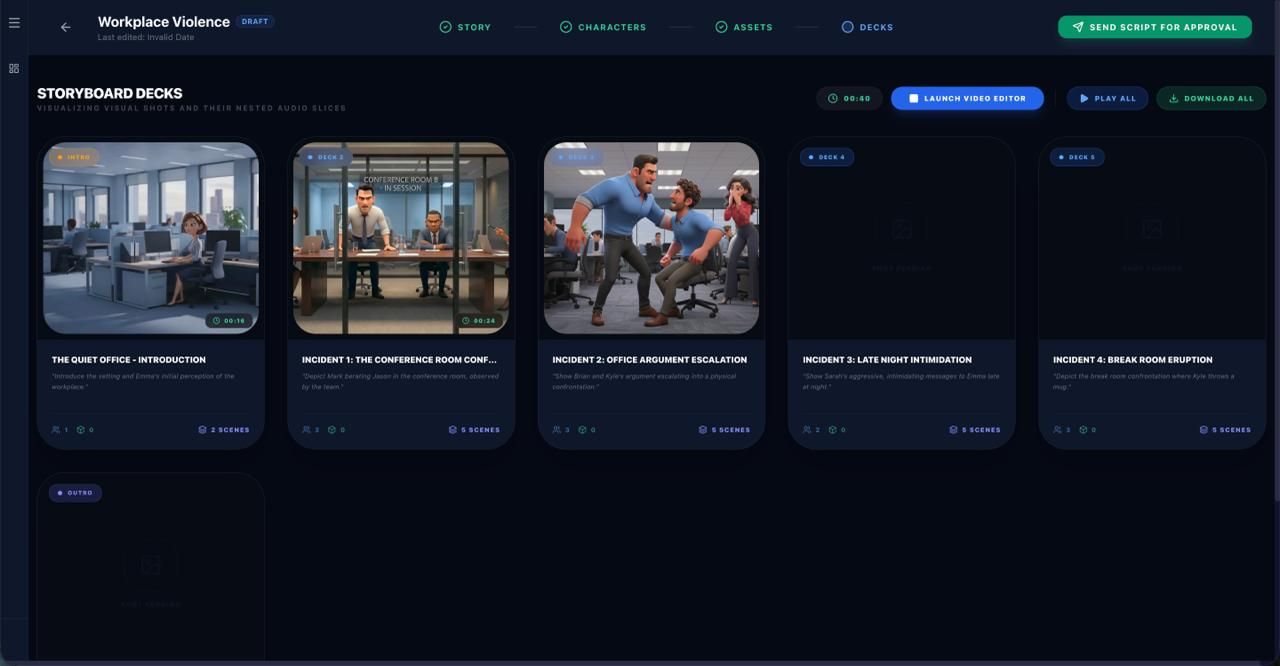
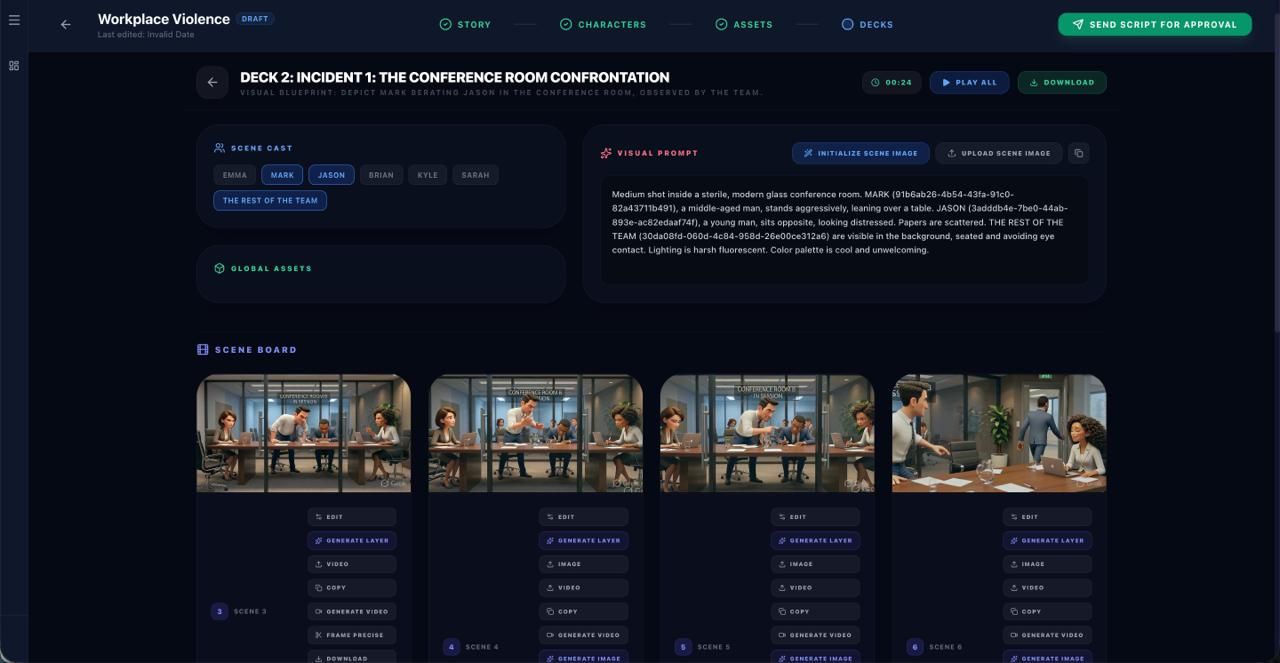
Choose your characters This is where it gets interesting. iKriyate Storyboard lets you use system-generated characters or upload your own custom characters and even assets. For a workplace violence training module, this matters, you want the characters to reflect your workforce. You can build scenarios that feel real to your employees rather than generic stock footage scenarios that could be from any company in any country.
Build the video scene by scene You produce the video one scene at a time, giving you full control over pacing, dialogue, and visual flow. Each scene maps back to your storyboard. You are not rendering a full video and hoping it looks right, you are building it deliberately, scene by scene, and can adjust as you go.
For our workplace violence module, the full video: script, storyboard, characters, scenes, it took 15 minutes.
Step 2: Gamify Your Training with Kriya Learn (15 Minutes)
Once your video is ready, download it from iKriyate and upload it directly into Kriya Learn.
This is where the training goes from something employees watch to something employees do.
Kriya Learn is an AI-powered eLearning authoring tool that lets you wrap your video in interactive game layers. Here is what other gamified features you can add:
- Scenario Pro: Scenario-based decision games ("Your colleague is being threatened: what do you do?")
- Video Gamification
- Crossword
- Fact or Fiction
- Flashcards
For compliance topics like workplace violence, scenario-based games are particularly powerful. Instead of asking "what is the definition of workplace violence," you put the employee inside a situation and ask them to respond. That is when real learning happens.
The feature most L&D teams do not expect: you can sequence the games in any order you choose. This means you control the learner's journey, warm them up with a lighter activity, build to a harder scenario, end with a knowledge check. Changing the sequence literally changes the player experience without rebuilding anything.
Once your game layers are in place, you have two options: download the module as a SCORM file and upload it to any LMS, or deploy it directly through Kriya Learn.
The gamification layer for our workplace violence module took 15 minutes.
Total time: 30 minutes. Start to finish.
Why This Matters for L&D Teams
The standard process for building a compliance training module looks something like this: brief an agency or instructional designer, wait for a draft, review, revise, wait again, get a SCORM file, upload to LMS. That process typically takes 4 to 6 weeks and costs anywhere between Rs. 60,000 and Rs. 1.5 lakh per module.
With iKriyate Storyboard and Kriya Learn, the person who knows the content best is your L&D manager, your HR head, your compliance officer who builds it themselves. Same day. No agency dependency, no waiting, no budget blown on production.
And because you are building it in-house, you can update it when policies change without briefing anyone or paying for revisions.
What Else Can You Build This Way
The workplace violence module is one example. The same workflow works for:
- POSH training (Prevention of Sexual Harassment)
- Fire safety and emergency response training
- Employee onboarding and induction
- Cybersecurity awareness training
- Sales skills and product knowledge
- Customer service scenario training
- Code of conduct and ethics compliance
Any topic where you want employees to not just watch but actually engage, retain, and apply — that is where interactive, gamified eLearning built with these tools makes sense.
Read more: How to Build Training Modules Without Instructional Designer | Kriya Stack
Try It Yourself
If you have been putting off a training module because the timeline or cost felt unreasonable then this is the alternative.
Pick a topic your team needs training on. Write a one-paragraph brief or a rough script. Upload it to iKriyate Storyboard. Build your video. Bring it into Kriya Learn. Add a game layer. Download your SCORM file.
30 minutes and its done.
Try Kriya Learn free at kriyastack.com or book a demo to see the full workflow live with your own content.
FAQ
Frequently asked questions
Related Articles

5 Signs Your Compliance Training Isn't Actually Working
Learn why compliance training often fails to change employee behavior and how scenario-based, role-specific training can improve judgment, reduce violations, and strengthen compliance outcomes.
How to Train a Distributed Manufacturing Workforce on Safety Compliance
A practical guide for training managers, EHS leads, and L&D teams running safety programs across multiple plants, shifts, and contractor crews.