
SCORM 1.2 vs. SCORM 2004: LMS Compatibility Guide
Confused between SCORM 1.2, SCORM 2004, and web links? Learn which export format works best for Workday, Cornerstone, Docebo, and Moodle to ensure seamless tracking and course delivery.
Key Takeaways
- SCORM 1.2 (Universal Workhorse): Best for Moodle or legacy platforms. Great for simple, short courses, but has a strict 4KB bookmark limit that can lose progress in long or complex modules.
- SCORM 2004 (Enterprise Gold Standard): Best for Workday, Cornerstone, and Docebo. Supports an expanded 64KB bookmark limit and separately tracks both Completion (viewed content) and Success (passed quiz).
- Web Links / iFrames (Dynamic Hosting): Best for content updated daily on a central server, but fails to send granular quiz scores back to your LMS gradebook without xAPI/LTI integration.
- LMS Selection Rule of Thumb:
- Use SCORM 2004 for Workday, Cornerstone, and Docebo.
- Use SCORM 1.2 for Moodle to avoid plugin tracking glitches.
When a learner pauses a course, the LMS stores bookmarking state, question progress, and variable data inside cmi.suspend_data. SCORM 1.2 strictly limits this payload to 4,096 characters (4KB). If a multi-module course exceeds this limit, the LMS silently stops saving progress, forcing learners to restart from slide 1. SCORM 2004 (3rd & 4th Edition) expands this limit to 64,000 characters (64KB), making it essential for complex simulations, interactive branch logic, and long enterprise modules
SCORM 1.2 vs. SCORM 2004 vs. Web Links: Which Format Should You Upload to Workday, Cornerstone, Docebo, or Moodle?
If you have ever spent hours building or purchasing an engaging corporate training course, only to hit an error screen during the upload process to your Learning Management System (LMS), you are not alone.
For L&D managers, HR teams, and LMS administrators, choosing the correct export format is often the difference between a seamless company-wide rollout and weeks of technical troubleshooting. With multiple formats available primarily SCORM 1.2, SCORM 2004, and External Web Links (iFrame/LTI), it can be confusing to know which package will reliably track completion, maintain bookmarking, and deliver accurate reporting on enterprise platforms like Workday, Cornerstone OnDemand, Docebo, or Moodle.
This comprehensive guide breaks down the core technical differences between these formats, evaluates how major enterprise LMS platforms handle them, and helps you select the exact format needed for your organization's compliance and training goals.
If you need an immediate answer for a course rollout today, use this compatibility matrix as a fast reference:
| LMS Platform | Primary Recommendation | Secondary Option | Key Technical Consideration |
|---|---|---|---|
Workday Learning | SCORM 2004 (3rd/4th Ed) | SCORM 1.2 | Workday handles advanced sequencing and split tracking best under SCORM 2004. |
Cornerstone OnDemand | SCORM 1.2 or SCORM 2004 | xAPI / Web Link | Cornerstone offers robust native support for both SCORM versions without issue |
Docebo | SCORM 2004 | SCORM 1.2 | Excellent cloud infrastructure that handles heavy 64k character bookmarking data. |
Moodle | SCORM 1.2 | Web Link / LTI | Moodle’s core SCORM engine is built around 1.2; SCORM 2004 can be plugin-dependent. |
Understanding the Core Formats
To understand why certain systems prefer one format over another, it helps to look under the hood at what these standards actually do when a learner opens a module.
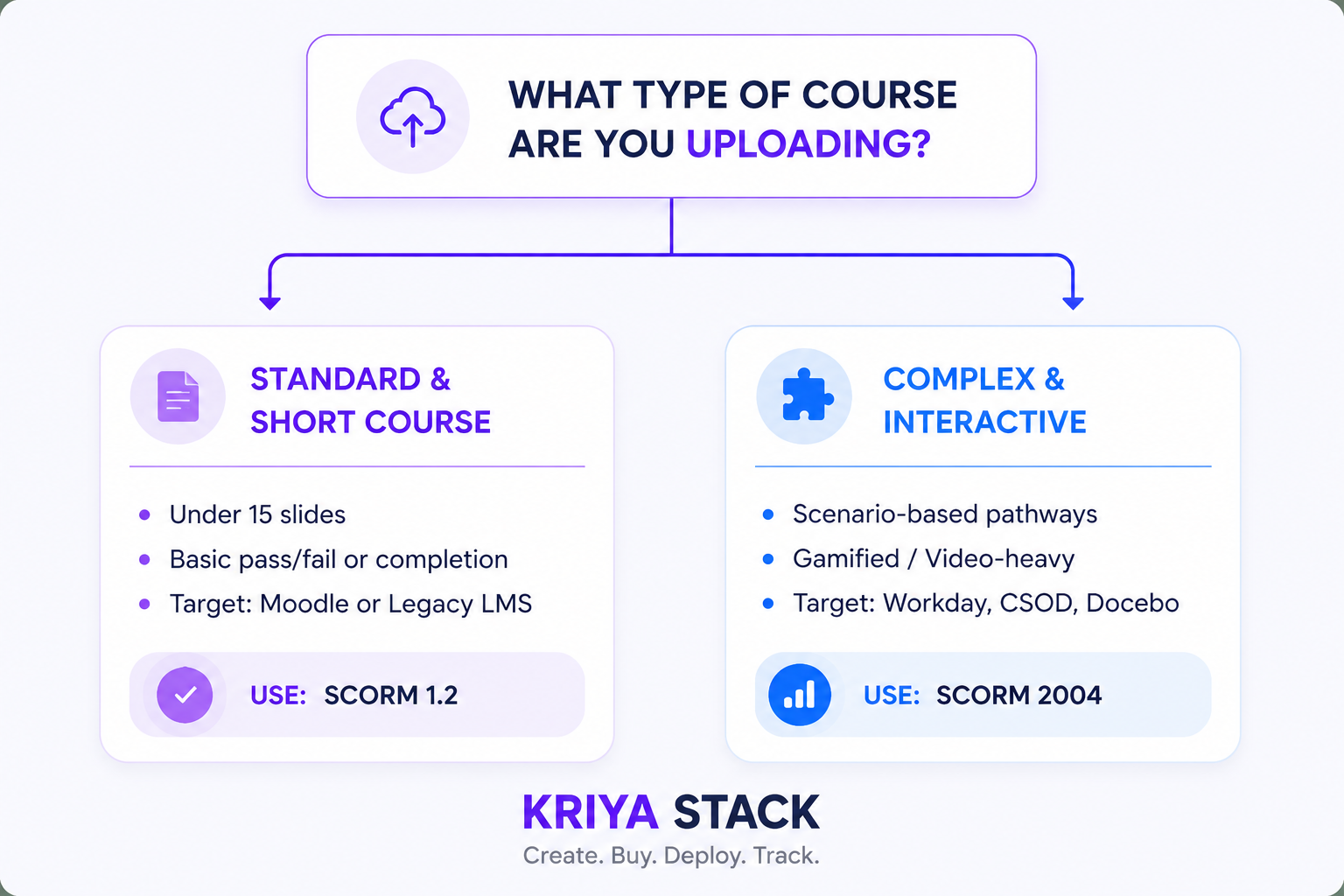
Infographic illustrating three eLearning delivery formats: SCORM 1.2, SCORM 2004, and web link deployment for Learning Management Systems (LMS).
1. SCORM 1.2: The Universal Workhorse
Released in 2001, SCORM 1.2 remains the most widely supported e-learning standard in the world. Virtually every LMS in existence whether legacy or cloud-native, can read a SCORM 1.2 .zip file.
- Primary Use Case: Simple completion tracking, single-sco modules, basic pass/fail reporting, and universal cross-platform deployment.
- The Bookmark Limit (4,096 Characters): SCORM 1.2 stores bookmarking data (where the user paused in the video or lesson) using a data field called cmi.suspend_data. In SCORM 1.2, this field is hard-capped at 4,096 characters (4KB). If your course is extremely long, highly interactive, or filled with intricate branching logic, the bookmarking string can exceed 4KB, causing the LMS to lose the learner's progress.
- Single Status Metric: SCORM 1.2 only reports one primary status parameter (e.g., Passed, Failed, Completed, or Incomplete). It cannot easily distinguish between a user who finished the course versus a user who achieved a passing quiz score within the same metric field.
2. SCORM 2004: The Detailed Enterprise Standard
Introduced to solve the limitations of SCORM 1.2, SCORM 2004 (particularly the 3rd and 4th Editions) introduced two game-changing technical upgrades:
- Separation of Completion and Success: SCORM 2004 allows the content package to report two distinct statuses simultaneously:
- Completion Status: (cmi.completion_status) $\rightarrow$ Completed vs. Incomplete
- Success Status: (cmi.success_status) $\rightarrow$ Passed vs. Failed
This means an administrator can track whether a learner viewed 100% of the slides and separately verify if they passed the final assessment.
- Expanded Suspend Data (64,000 Characters): SCORM 2004 expanded the suspend_data storage limit from 4,096 characters to 64,000 characters in the 3rd and 4th editions. This effectively eliminates progress loss issues in complex, highly interactive, multi-module, or gamified training.
"For high-stakes compliance environments where tracking both completion and test scores is mandatory for audits, see our OSHA Lockout Tagout (LOTO) training guide for a real-world implementation example.
3. Web Links, iFrames, and LTI
Instead of uploading a packaged .zip file directly into your LMS storage, Web Links host the content on a remote server while embedding it into the LMS course window using iFrame player containers, LTI (Learning Tools Interoperability), or external cloud links.
- Primary Use Case: Content that changes frequently (e.g., dynamic software tutorials or rapidly updating compliance laws) where updating a single central server automatically updates the course across every connected LMS.
- The Drawback: Basic iFrame web links do not natively pass detailed score, timing, or completion metrics back to your LMS gradebook unless paired with an external tracking architecture like LTI or xAPI (Tin Can).
Deep-Dive: Format Selection by LMS Platform
Workday Learning
Workday is a modern enterprise Human Capital Management (HCM) ecosystem. Its LMS player is designed to handle complex reporting hierarchies for large global workforces.
- Recommended Format: SCORM 2004 (3rd or 4th Edition)
- Why: Workday leverages SCORM 2004’s dual-status tracking to give HR administrators granular compliance metrics. If you upload a SCORM 1.2 file with a mandatory quiz, Workday may mark the course complete the second the user reaches the end screen, regardless of whether they passed or failed the assessment. Using SCORM 2004 ensures Workday logs both time-spent compliance and assessment scores accurately.
Cornerstone OnDemand (CSOD)
Cornerstone is one of the most robust, enterprise-grade learning platforms on the market, serving millions of corporate learners globally.
- Recommended Format: SCORM 1.2 or SCORM 2004
- Why: Cornerstone handles both standards with high stability. However, if your course includes heavy interactivity, such as scenario-based branch pathways, interactive crosswords, or custom AI avatars, opt for SCORM 2004. This prevents the course from hitting Cornerstone's session time-out limits and ensures the expanded 64k suspend_data buffer captures every interaction state cleanly.
Docebo
Docebo is an AI-powered, cloud-native LMS built for fast-growing companies and enterprise internal/external training programs.
- Recommended Format: SCORM 2004
- Why: Docebo’s modern player environment natively prefers SCORM 2004 architectures. It reads multi-sco structures smoothly and handles automated notifications based on granular Passed vs. Completed triggers. If you are uploading off-the-shelf SCORM modules for compliance (e.g., Information Security, Sexual Harassment Prevention, or Safety Training), SCORM 2004 in Docebo provides the cleanest reporting dashboards for auditing.
Moodle
Moodle is the world's most popular open-source LMS, heavily utilized by universities, government entities, and mid-market enterprises.
- Recommended Format: SCORM 1.2
- Why: While Moodle has added experimental support for SCORM 2004 over the years, its core SCORM module engine (mod_scorm) was fundamentally engineered around the SCORM 1.2 standard. Uploading complex SCORM 2004 packages with heavy sequencing rules into Moodle can occasionally cause navigation locking or unexpected tracking bugs depending on the server setup or active Moodle plugins. For 100% reliability in Moodle, SCORM 1.2 remains the safest choice.
Summary Checklist: How to Choose in 30 Seconds
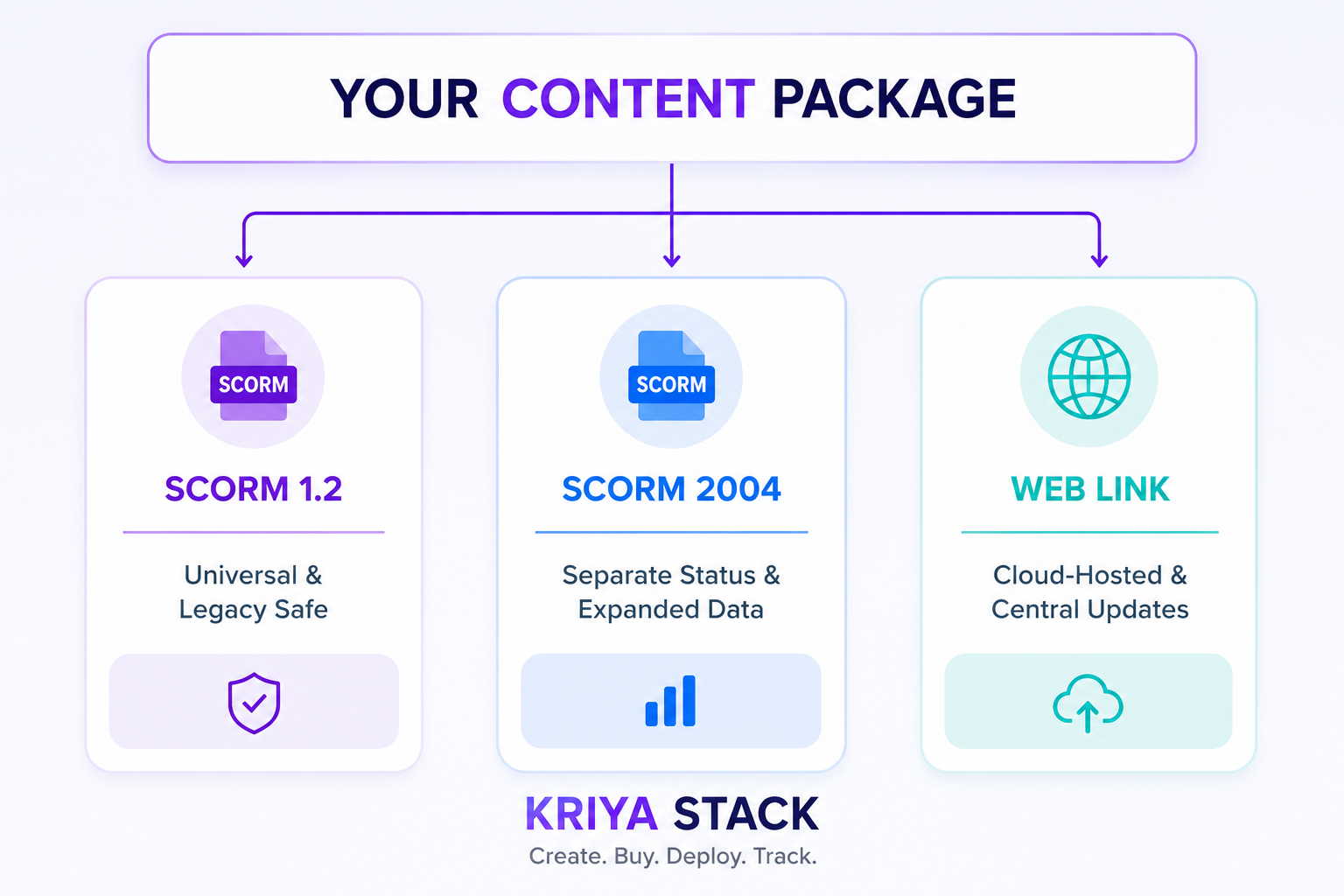
Decision tree explaining when to use SCORM 1.2 or SCORM 2004 based on course complexity, LMS compatibility, and interactive learning requirements.
Choose SCORM 1.2 if:
- You are deploying to Moodle or an older legacy LMS.
- The course is short (under 15–20 minutes) with minimal branching logic.
- You only care about logging a simple Completion event for regulatory sign-off.
Choose SCORM 2004 if:
- You are deploying to Workday, Cornerstone, or Docebo.
- The course is longer, features complex branching scenarios, video quizzes, or interactive mini-games.
- You need to verify both that the user viewed all content AND passed the exam.
Choose a Web Link / iFrame if:
- You are running a live pilot and updating course content daily on a centralized server.
- You do not need the LMS to store individual question-level reporting or gradebook scores.
Eliminate Format Headaches with Kriya Stack
One of the biggest frustrations L&D teams face when purchasing off-the-shelf training or building custom courses with third-party tools is being forced into a single format that doesn't fit their LMS environment.
At Kriya Stack, we eliminate format locks entirely:
- Dual Export Packages Out-of-the-Box: Whether you are browsing our extensive Off-the-Shelf SCORM Course Catalog or generating custom interactive modules with our AI Course Builder, every single course includes both SCORM 1.2 and SCORM 2004 (3rd & 4th Edition) ZIP files ready for instant download.
- 100% Universal Compatibility: Our courses are built to WCAG 2.1 AA accessibility standards and are fully tested across Workday, Cornerstone, Docebo, Moodle, TalentLMS, and SAP Litmos.
- Unlimited Flat-Fee Licensing: Say goodbye to per-user seat fees. Upload your SCORM packages to any LMS and train your entire organization without hidden costs.
Ready to upgrade your training stack? Explore our ready-to-deploy course library or test our AI authoring tools today at kriyastack.com.
If you are deciding which authoring tool to use alongside your LMS, compare how different AI course builders handle SCORM exports in our Articulate Rise vs. Kriya Stack comparison.
Read More From Our L&D & SCORM Resource Library
Looking to optimize your organization's learning stack, boost course completion rates, or streamline your authoring workflow? Explore these related guides from our team:
- Per-Seat vs. Flat-Fee SCORM Licensing: The True Cost of Enterprise Training
Uncover the hidden costs of traditional per-seat licensing models and learn how flat-fee SCORM catalogs can save your L&D budget as your workforce scales. - The Real Reason Corporate Gamification Fails (It’s Not What You Think)
Avoid the common pitfall of bolting artificial points and badges onto boring courses, and discover how to build meaningful interactions that actually drive performance.
Ready to Simplify Your LMS Deployments?
Stop fighting LMS upload errors and formatting restrictions. Try Kriya Stack to instantly build interactive AI training or browse our off-the-shelf SCORM course catalog—complete with dual SCORM 1.2 and SCORM 2004 export packages out of the box.
👉Start Your Free Trial or Book a Live Demo to watch us build a course on your topic live in 30 minutes!
FAQ
Frequently asked questions
SCORM 1.2 and SCORM 2004 are e-learning standards used to package and deploy online training courses in Learning Management Systems (LMS). While both support learner tracking, SCORM 2004 offers enhanced capabilities such as separate completion and success status, improved sequencing, and a significantly larger bookmarking limit (64,000 characters compared to SCORM 1.2's 4,096 characters). SCORM 1.2 remains the most universally supported standard across legacy and modern LMS platforms.
Neither standard is universally better—it depends on your LMS and training requirements. SCORM 1.2 is ideal for simple courses and maximum compatibility, while SCORM 2004 is better suited for interactive, scenario-based learning that requires advanced reporting, bookmarking, and separate completion and assessment tracking.
A Web Link (or iFrame link) delivers training by hosting the course on a secure external server instead of uploading a SCORM package into the LMS. This approach is ideal for frequently updated content because changes made on the hosted version are immediately available to all learners without re-uploading the course. However, detailed learner tracking typically requires LTI or xAPI integration
Neither standard is universally better—it depends on your LMS and training requirements. SCORM 1.2 is ideal for simple courses and maximum compatibility, while SCORM 2004 is better suited for interactive, scenario-based learning that requires advanced reporting, bookmarking, and separate completion and assessment tracking.
Not all LMS platforms fully support SCORM 2004. While enterprise systems like Workday, Docebo, and Cornerstone provide strong SCORM 2004 compatibility, some LMS platforms, particularly older or open-source implementations—are primarily optimised for SCORM 1.2. Checking your LMS documentation before publishing is recommended.
Yes. Kriya Stack courses are designed for enterprise LMS compatibility and can be deployed on platforms such as Workday Learning, Cornerstone OnDemand, Docebo, Moodle, TalentLMS, SAP Litmos, and many other SCORM-compliant Learning Management Systems. Courses are available in SCORM 1.2 , SCORM 2004 , and Web Link (iFrame) formats to support different deployment requirements.
Kriya Stack provides every ready-made course and AI-generated course in multiple deployment formats to ensure maximum LMS compatibility. Customers receive: SCORM 1.2 SCORM 2004 (3rd & 4th Edition) Web Link (iFrame) This flexibility allows organisations to deploy training using the format best suited to their Learning Management System and reporting requirements.
Your choice depends on your LMS and training goals: Choose SCORM 1.2 for maximum compatibility with legacy LMS platforms and straightforward compliance training. Choose SCORM 2004 for interactive courses, advanced reporting, and enterprise LMS platforms like Workday, Cornerstone, and Docebo. Choose a Web Link (iFrame) when you need centrally hosted content that can be updated without republishing the course.
Related Articles

Third-Party Risk Training for Employees: A Practical Compliance Checklist
Learn how employees can identify third-party risks, spot suspicious vendor activity, protect sensitive data and follow a practical compliance checklist to strengthen your organisation’s risk management programme.

7 Leadership Training Areas Every Manager Should Master
7 leadership training areas every manager should master, from delegation and feedback to psychological safety, conflict resolution, mental health and harassment prevention.